


This is a amazing processs that helps you to shutdown your computer with help of simple Email or SMS.
You must follow these simple steps......
STEP 1 : Create "Shutdown.bat"
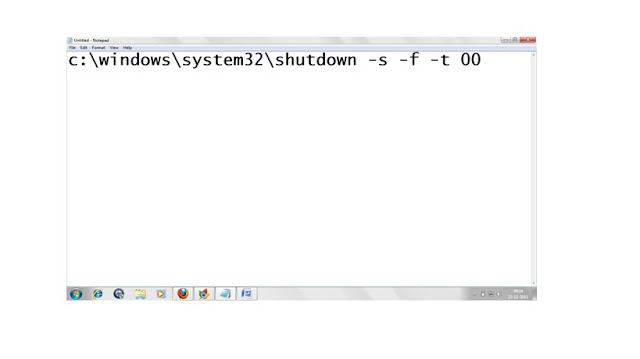
-> Firstly open the Notepad and write this command "c:\windows\system32\shutdown -s -f -t 00" and
save this in C drive.


You must follow these simple steps......
STEP 1 : Create "Shutdown.bat"
-> Firstly open the Notepad and write this command "c:\windows\system32\shutdown -s -f -t 00" and
save this in C drive.

Step 2: Get Pop3 capable email address
->You can create simple gmail account By typing in url "www.gmail.com" and signup there.

Step 3: Setup Microsoft Outlook.
->Open Microsoft Outlook.
->Go to Tools->Account Setting ->Email->new Email

Step 4 : Make Sure That Your Email is POP 3 enable
->After adding new email make it sure its pop3 enable.
->check manual settings and the More setting.
->Click on advancee
->In Incoming server type 995.

Step 5: SetUp Outlook Rule
->Send /Receive settings->Define Send/Receive Group

->Schedule an automatic send /receive every 1 min

->Tools -> Rules and Alert ->New Rule -> Start blank rule -> Check when they arrive -> next->
With specific words in the subject
->Write "shutdown" and the add

-> Click on Start an application then give a path to shutdown.bat ->next->apply

Step 6: Now send Email to your id
-> Now send Email to your POP3 enable email id with text shutdown .


.jpg)


